> ## Documentation Index
> Fetch the complete documentation index at: https://neverminedag-feat-use-cases-section.mintlify.site/llms.txt
> Use this file to discover all available pages before exploring further.
# Embed Nevermined Widgets
> Drop Nevermined checkout, card enrollment, and delegation flows into your own site as iframes signed by your organization.
If you run a Nevermined organization, you can embed Nevermined-hosted UI flows directly into your site instead of redirecting customers to nevermined.app. Your end-users stay on your domain; the iframe handles auth, payments, and card delegations against the Nevermined backend.
This guide is for organization admins. If you haven't upgraded to an organization yet, see [Platform Partners](/docs/integrations/organizations) first.
## What you can embed
Sell agent plans from your own pricing page. Reports a transaction hash on success.
Let users add a payment method without leaving your site. Returns the resulting `paymentMethodId`.
List enrolled cards, create delegations, and revoke either — without redirecting to nevermined.app.
## How it works
```
Your server → createInitToken({ userId, orgId, secretKey })
→ initToken (JWT, valid 5 minutes)
Browser → NeverminedWidgets.initialize({ initToken, environment })
→ exchanges initToken for a session, mounts iframe(s)
Iframe → postMessage events: nvm:ready, nvm:success, nvm:error, nvm:close
```
The widget secret never leaves your server. Your backend mints a short-lived `initToken` per browser session; the SDK exchanges it for a 2-hour widget session that scopes every API call to a single end-user from your system.
The `secretKey` is the equivalent of a password for your organization's widget surface. Anyone who has it can mint tokens that act as any end-user of your org. Keep it in environment variables on a server you control — never commit it, never bundle it into client-side JavaScript.
## Setup
Open [Settings > Organization](https://nevermined.app/organization) in the Nevermined App and scroll to the **Widget Integration** section.
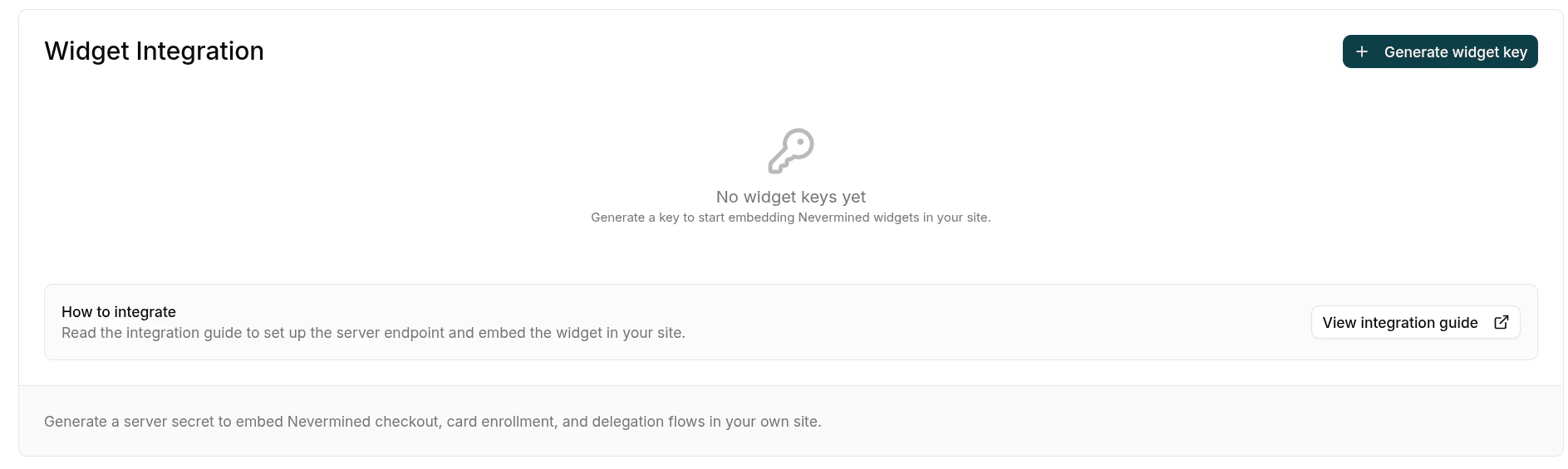 Click **Generate widget key** and fill in the dialog:
* **Name** — a descriptive label, e.g. `Production website`.
* **Allowed origins** — every domain where the widget will be mounted, e.g. `https://yourcompany.com` and `https://staging.yourcompany.com`. At least one origin is required. Use **Add origin** to add more rows. No path, query, fragment, or trailing slash.
Click **Generate widget key** and fill in the dialog:
* **Name** — a descriptive label, e.g. `Production website`.
* **Allowed origins** — every domain where the widget will be mounted, e.g. `https://yourcompany.com` and `https://staging.yourcompany.com`. At least one origin is required. Use **Add origin** to add more rows. No path, query, fragment, or trailing slash.
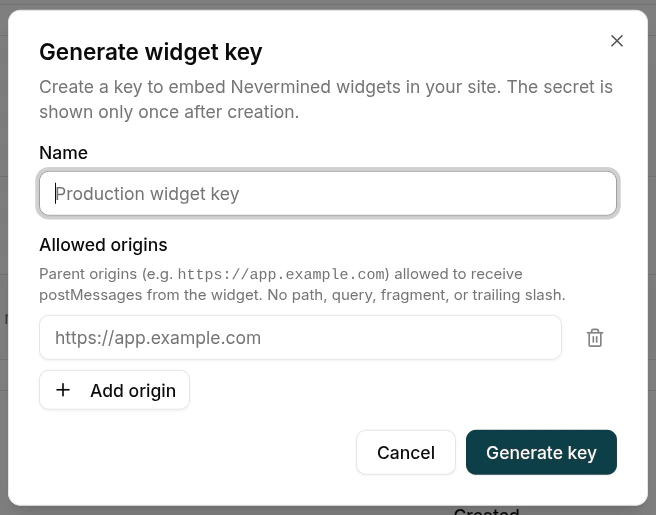 The Nevermined backend rejects widget sessions whose `parentOrigin` doesn't match this allowlist — it's your second line of defense if the secret ever leaks. You can edit the list later from the key's actions menu without rotating the secret.
Click **Generate key**. The raw secret is shown **once**. Copy it and store it as an environment variable on your server (for example, `NVM_WIDGET_SECRET`). You won't see it again.
The Nevermined backend rejects widget sessions whose `parentOrigin` doesn't match this allowlist — it's your second line of defense if the secret ever leaks. You can edit the list later from the key's actions menu without rotating the secret.
Click **Generate key**. The raw secret is shown **once**. Copy it and store it as an environment variable on your server (for example, `NVM_WIDGET_SECRET`). You won't see it again.
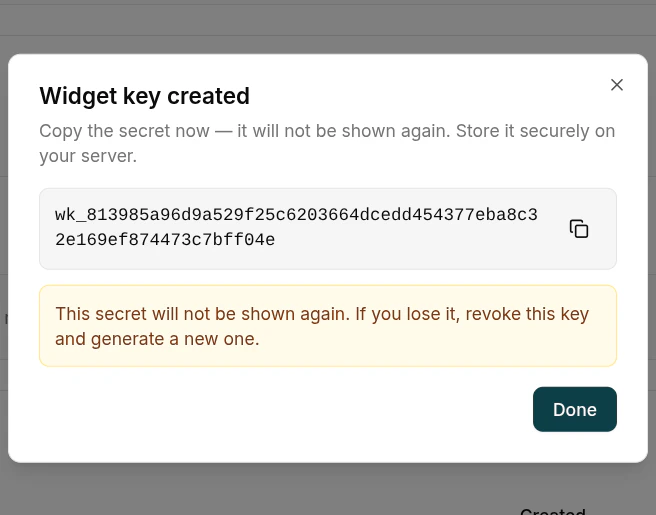 If you lose the secret, revoke the key from the dashboard and generate a new one. There's no recovery path — that's by design.
Install the server SDK on your backend and expose a small endpoint that signs an `initToken` for the currently logged-in end-user.
```bash theme={null}
npm install @nevermined-io/ui-widgets-server
```
The call is the same regardless of framework:
```ts theme={null}
import { createInitToken } from '@nevermined-io/ui-widgets-server'
const initToken = await createInitToken({
userId: '',
orgId: '',
secretKey: process.env.NVM_WIDGET_SECRET!,
})
```
Pick the framework that matches your stack:
```ts theme={null}
// vite.config.ts
import { defineConfig } from 'vite'
export default defineConfig({
plugins: [
{
name: 'nvm-init-token',
configureServer(server) {
server.middlewares.use('/api/init-token', async (req, res) => {
const { createInitToken } = await import('@nevermined-io/ui-widgets-server')
const initToken = await createInitToken({
userId: req.headers['x-user-id'] as string, // resolve from your auth
orgId: process.env.NVM_ORG_ID!,
secretKey: process.env.NVM_WIDGET_SECRET!,
})
res.setHeader('content-type', 'application/json')
res.end(JSON.stringify({ initToken, environment: 'sandbox' }))
})
},
},
],
})
```
```ts theme={null}
import express from 'express'
import { createInitToken } from '@nevermined-io/ui-widgets-server'
const app = express()
app.get('/api/init-token', async (req, res) => {
const initToken = await createInitToken({
userId: req.user!.id, // from your auth middleware
orgId: process.env.NVM_ORG_ID!,
secretKey: process.env.NVM_WIDGET_SECRET!,
})
res.json({ initToken, environment: 'sandbox' })
})
```
```ts theme={null}
// app/api/init-token/route.ts
import { NextResponse } from 'next/server'
import { createInitToken } from '@nevermined-io/ui-widgets-server'
import { auth } from '@/lib/auth'
export async function GET() {
const session = await auth()
if (!session?.user?.id) {
return NextResponse.json({ error: 'Unauthorized' }, { status: 401 })
}
const initToken = await createInitToken({
userId: session.user.id,
orgId: process.env.NVM_ORG_ID!,
secretKey: process.env.NVM_WIDGET_SECRET!,
})
return NextResponse.json({ initToken, environment: 'sandbox' })
}
```
`userId` identifies the **end-user of your site**, not the org admin. Resolve it from your auth session — Nevermined uses it as the `sub` of the session JWT to scope every widget action to that user.
Install the browser SDK on your frontend.
```bash theme={null}
npm install @nevermined-io/ui-widgets
```
Fetch the `initToken` from your endpoint and initialize the SDK. The same `nvm` instance can mount any of the available widgets.
```ts theme={null}
import { NeverminedWidgets } from '@nevermined-io/ui-widgets'
const { initToken, environment } = await fetch('/api/init-token').then(r => r.json())
const nvm = await NeverminedWidgets.initialize({ initToken, environment })
```
Then mount whichever widget you need into a container element on your page:
```ts theme={null}
nvm.checkout.start({
did: 'did:nv:',
// planId is optional; omit to show the plan carousel
container: document.getElementById('checkout-widget')!,
onReady: () => console.log('Widget rendered'),
onSuccess: ({ did, planId, txHash }) => {
console.log('Purchase complete', { did, planId, txHash })
},
onError: (err) => console.error('Checkout failed', err),
onClose: () => console.log('User closed the widget'),
})
```
```ts theme={null}
nvm.delegations.enrollCard({
container: document.getElementById('enroll-widget')!,
onSuccess: ({ paymentMethodId }) => {
console.log('Card enrolled', paymentMethodId)
},
onError: (err) => console.error('Enrollment failed', err),
})
```
```ts theme={null}
nvm.delegations.listCards({
container: document.getElementById('cards-widget')!,
onCardAction: ({ action, paymentMethodId }) => {
if (action === 'delegate') {
nvm.delegations.createDelegation({
paymentMethodId,
container: document.getElementById('cards-widget')!,
onSuccess: ({ delegationId }) => console.log('Delegated', delegationId),
})
}
},
})
```
## Available widgets
| Method | Mounts iframe | Result |
| ----------------------------------------------------------------------- | -------------------- | --------------------------------------------------------- |
| `nvm.checkout.start({ did, planId?, container, ... })` | yes | `onSuccess`: `{ did, planId, txHash }` |
| `nvm.delegations.enrollCard({ container, ... })` | yes | `onSuccess`: `{ paymentMethodId }` |
| `nvm.delegations.listCards({ container, onCardAction, ... })` | yes | `onCardAction`: `{ action: 'delegate', paymentMethodId }` |
| `nvm.delegations.createDelegation({ paymentMethodId, container, ... })` | yes | `onSuccess`: `{ delegationId, paymentMethodId }` |
| `await nvm.delegations.revokeCard(paymentMethodId)` | no — direct API call | resolves on 2xx |
| `await nvm.delegations.revokeDelegation(delegationId)` | no — direct API call | resolves on 2xx |
All iframe-mounting methods share the same lifecycle:
| Callback | When |
| ----------- | ------------------------------------------- |
| `onBooted` | iframe DOM mounted (auth not yet validated) |
| `onReady` | session validated, widget interactive |
| `onSuccess` | terminal success — widget destroys itself |
| `onError` | terminal error — widget destroys itself |
| `onClose` | user closed the widget — instance destroyed |
Once a widget instance fires `onSuccess`, `onError`, or `onClose`, it's terminal: calling its method again throws. Construct a fresh widget via the same `nvm` instance to mount another flow.
## Environments
Pick the environment that matches the Nevermined dashboard you used to mint the widget key.
| Environment | API base | Webapp base | When to use |
| ----------- | ------------------------------------ | ------------------------ | ------------------------------------------------ |
| `sandbox` | `https://api.sandbox.nevermined.app` | `https://nevermined.app` | Testing on Base Sepolia with sandbox credentials |
| `live` | `https://api.live.nevermined.app` | `https://nevermined.app` | Production on Base mainnet |
## Production checklist
Keep `NVM_WIDGET_SECRET` in your runtime env vars. Never commit it, never ship it to the browser, never put it in `NEXT_PUBLIC_*` or `VITE_*` variables.
Add every domain where you mount the widget. The backend rejects sessions from any other origin.
Serve both your site and your initToken endpoint over HTTPS in production. `parentOrigin` includes the scheme, so origins must match exactly.
Pass the actual end-user identifier from your auth — never a placeholder, never the same value for every visitor.
If the secret might have leaked, revoke the key from the dashboard and generate a new one. Update your env var and redeploy.
Default `initToken` expiry is 5 minutes — leave it. Don't cache the token server-side.
## Troubleshooting
| Symptom | Cause | Fix |
| ------------------------------------------------------------ | ------------------------------------------------------- | ----------------------------------------------------------------------------------------------- |
| `onError`: `UNAUTHORIZED`, apiCode `BCK.WIDGET_SESSION.0001` | initToken expired or signed with a wrong/revoked secret | Mint a fresh token; verify your secret matches the active key in the dashboard |
| `onError`: `UNAUTHORIZED`, apiCode `BCK.WIDGET_SESSION.0002` | The org has no active widget keys | Generate one in the dashboard |
| `onError`: `UNAUTHORIZED`, apiCode `BCK.WIDGET_SESSION.0005` | Session token expired (default 2h) | The SDK auto-refreshes; if it fails persistently, re-fetch the initToken from your server |
| `onError`: `UNAUTHORIZED`, apiCode `BCK.WIDGET_SESSION.0007` | initToken missing `orgId` or `wallet` claim | Upgrade `@nevermined-io/ui-widgets-server` to the latest version |
| `onError`: `UNAUTHORIZED`, apiCode `BCK.WIDGET_SESSION.0011` | The widget key was revoked while the session was alive | Mint a new `initToken` with the new key |
| `onError`: `NETWORK` | Fetch failed before getting a response | Check your network, CORS, and that the `environment` matches the API you minted the key against |
| Widget mounts but never fires `onReady` | `parentOrigin` doesn't match `allowedOrigins` | Add your site's origin to the key's allowlist (mind the scheme: `https://` vs `http://`) |
| `[NeverminedWidgets] initialize: invalid environment` | `environment` is not a supported value | Use `'sandbox'` or `'live'` |
## Related
Background on Nevermined organizations and how to upgrade your account.
How Nevermined card enrollment works under the hood — the widget surfaces this same flow.
If you lose the secret, revoke the key from the dashboard and generate a new one. There's no recovery path — that's by design.
Install the server SDK on your backend and expose a small endpoint that signs an `initToken` for the currently logged-in end-user.
```bash theme={null}
npm install @nevermined-io/ui-widgets-server
```
The call is the same regardless of framework:
```ts theme={null}
import { createInitToken } from '@nevermined-io/ui-widgets-server'
const initToken = await createInitToken({
userId: '',
orgId: '',
secretKey: process.env.NVM_WIDGET_SECRET!,
})
```
Pick the framework that matches your stack:
```ts theme={null}
// vite.config.ts
import { defineConfig } from 'vite'
export default defineConfig({
plugins: [
{
name: 'nvm-init-token',
configureServer(server) {
server.middlewares.use('/api/init-token', async (req, res) => {
const { createInitToken } = await import('@nevermined-io/ui-widgets-server')
const initToken = await createInitToken({
userId: req.headers['x-user-id'] as string, // resolve from your auth
orgId: process.env.NVM_ORG_ID!,
secretKey: process.env.NVM_WIDGET_SECRET!,
})
res.setHeader('content-type', 'application/json')
res.end(JSON.stringify({ initToken, environment: 'sandbox' }))
})
},
},
],
})
```
```ts theme={null}
import express from 'express'
import { createInitToken } from '@nevermined-io/ui-widgets-server'
const app = express()
app.get('/api/init-token', async (req, res) => {
const initToken = await createInitToken({
userId: req.user!.id, // from your auth middleware
orgId: process.env.NVM_ORG_ID!,
secretKey: process.env.NVM_WIDGET_SECRET!,
})
res.json({ initToken, environment: 'sandbox' })
})
```
```ts theme={null}
// app/api/init-token/route.ts
import { NextResponse } from 'next/server'
import { createInitToken } from '@nevermined-io/ui-widgets-server'
import { auth } from '@/lib/auth'
export async function GET() {
const session = await auth()
if (!session?.user?.id) {
return NextResponse.json({ error: 'Unauthorized' }, { status: 401 })
}
const initToken = await createInitToken({
userId: session.user.id,
orgId: process.env.NVM_ORG_ID!,
secretKey: process.env.NVM_WIDGET_SECRET!,
})
return NextResponse.json({ initToken, environment: 'sandbox' })
}
```
`userId` identifies the **end-user of your site**, not the org admin. Resolve it from your auth session — Nevermined uses it as the `sub` of the session JWT to scope every widget action to that user.
Install the browser SDK on your frontend.
```bash theme={null}
npm install @nevermined-io/ui-widgets
```
Fetch the `initToken` from your endpoint and initialize the SDK. The same `nvm` instance can mount any of the available widgets.
```ts theme={null}
import { NeverminedWidgets } from '@nevermined-io/ui-widgets'
const { initToken, environment } = await fetch('/api/init-token').then(r => r.json())
const nvm = await NeverminedWidgets.initialize({ initToken, environment })
```
Then mount whichever widget you need into a container element on your page:
```ts theme={null}
nvm.checkout.start({
did: 'did:nv:',
// planId is optional; omit to show the plan carousel
container: document.getElementById('checkout-widget')!,
onReady: () => console.log('Widget rendered'),
onSuccess: ({ did, planId, txHash }) => {
console.log('Purchase complete', { did, planId, txHash })
},
onError: (err) => console.error('Checkout failed', err),
onClose: () => console.log('User closed the widget'),
})
```
```ts theme={null}
nvm.delegations.enrollCard({
container: document.getElementById('enroll-widget')!,
onSuccess: ({ paymentMethodId }) => {
console.log('Card enrolled', paymentMethodId)
},
onError: (err) => console.error('Enrollment failed', err),
})
```
```ts theme={null}
nvm.delegations.listCards({
container: document.getElementById('cards-widget')!,
onCardAction: ({ action, paymentMethodId }) => {
if (action === 'delegate') {
nvm.delegations.createDelegation({
paymentMethodId,
container: document.getElementById('cards-widget')!,
onSuccess: ({ delegationId }) => console.log('Delegated', delegationId),
})
}
},
})
```
## Available widgets
| Method | Mounts iframe | Result |
| ----------------------------------------------------------------------- | -------------------- | --------------------------------------------------------- |
| `nvm.checkout.start({ did, planId?, container, ... })` | yes | `onSuccess`: `{ did, planId, txHash }` |
| `nvm.delegations.enrollCard({ container, ... })` | yes | `onSuccess`: `{ paymentMethodId }` |
| `nvm.delegations.listCards({ container, onCardAction, ... })` | yes | `onCardAction`: `{ action: 'delegate', paymentMethodId }` |
| `nvm.delegations.createDelegation({ paymentMethodId, container, ... })` | yes | `onSuccess`: `{ delegationId, paymentMethodId }` |
| `await nvm.delegations.revokeCard(paymentMethodId)` | no — direct API call | resolves on 2xx |
| `await nvm.delegations.revokeDelegation(delegationId)` | no — direct API call | resolves on 2xx |
All iframe-mounting methods share the same lifecycle:
| Callback | When |
| ----------- | ------------------------------------------- |
| `onBooted` | iframe DOM mounted (auth not yet validated) |
| `onReady` | session validated, widget interactive |
| `onSuccess` | terminal success — widget destroys itself |
| `onError` | terminal error — widget destroys itself |
| `onClose` | user closed the widget — instance destroyed |
Once a widget instance fires `onSuccess`, `onError`, or `onClose`, it's terminal: calling its method again throws. Construct a fresh widget via the same `nvm` instance to mount another flow.
## Environments
Pick the environment that matches the Nevermined dashboard you used to mint the widget key.
| Environment | API base | Webapp base | When to use |
| ----------- | ------------------------------------ | ------------------------ | ------------------------------------------------ |
| `sandbox` | `https://api.sandbox.nevermined.app` | `https://nevermined.app` | Testing on Base Sepolia with sandbox credentials |
| `live` | `https://api.live.nevermined.app` | `https://nevermined.app` | Production on Base mainnet |
## Production checklist
Keep `NVM_WIDGET_SECRET` in your runtime env vars. Never commit it, never ship it to the browser, never put it in `NEXT_PUBLIC_*` or `VITE_*` variables.
Add every domain where you mount the widget. The backend rejects sessions from any other origin.
Serve both your site and your initToken endpoint over HTTPS in production. `parentOrigin` includes the scheme, so origins must match exactly.
Pass the actual end-user identifier from your auth — never a placeholder, never the same value for every visitor.
If the secret might have leaked, revoke the key from the dashboard and generate a new one. Update your env var and redeploy.
Default `initToken` expiry is 5 minutes — leave it. Don't cache the token server-side.
## Troubleshooting
| Symptom | Cause | Fix |
| ------------------------------------------------------------ | ------------------------------------------------------- | ----------------------------------------------------------------------------------------------- |
| `onError`: `UNAUTHORIZED`, apiCode `BCK.WIDGET_SESSION.0001` | initToken expired or signed with a wrong/revoked secret | Mint a fresh token; verify your secret matches the active key in the dashboard |
| `onError`: `UNAUTHORIZED`, apiCode `BCK.WIDGET_SESSION.0002` | The org has no active widget keys | Generate one in the dashboard |
| `onError`: `UNAUTHORIZED`, apiCode `BCK.WIDGET_SESSION.0005` | Session token expired (default 2h) | The SDK auto-refreshes; if it fails persistently, re-fetch the initToken from your server |
| `onError`: `UNAUTHORIZED`, apiCode `BCK.WIDGET_SESSION.0007` | initToken missing `orgId` or `wallet` claim | Upgrade `@nevermined-io/ui-widgets-server` to the latest version |
| `onError`: `UNAUTHORIZED`, apiCode `BCK.WIDGET_SESSION.0011` | The widget key was revoked while the session was alive | Mint a new `initToken` with the new key |
| `onError`: `NETWORK` | Fetch failed before getting a response | Check your network, CORS, and that the `environment` matches the API you minted the key against |
| Widget mounts but never fires `onReady` | `parentOrigin` doesn't match `allowedOrigins` | Add your site's origin to the key's allowlist (mind the scheme: `https://` vs `http://`) |
| `[NeverminedWidgets] initialize: invalid environment` | `environment` is not a supported value | Use `'sandbox'` or `'live'` |
## Related
Background on Nevermined organizations and how to upgrade your account.
How Nevermined card enrollment works under the hood — the widget surfaces this same flow.